SSO Methods
This document is for developers building custom applications that support a Northwestern netID SSO option.
It provides recommendations and insights meant to help choose an appropriate SSO implementation. The decisions and implementation are ultimately the responsibility of the development team.
This document is not general-purpose SSO method selection guidance for SaaS, vended, or other situations. This document does not include handling for non-Northwestern users without netIDs or other cases where anonymous access is required.
Available Options
Section titled “Available Options”There are several ways to do single-sign on for netIDs. Any selected SSO option MUST include Duo multifactor authentication (MFA) as part of the process.
Developers SHOULD use Entra ID. It supports both OpenID Connect (OIDC) or SAML to integrate into an application. It supports a variety of OIDC flows for traditional web apps, single-page web apps (SPAs), and mobile/desktop apps.
| Type | Technology | Hosting | Supported? |
|---|---|---|---|
| Microsoft Entra1 ID | OIDC/OAuth2 or SAML | Azure | ✅ Yes |
| Shibboleth2 | SAML | On-prem | ✅ Yes |
| Agentless SSO | Bespoke PingAM APIs | On-prem | ⌛ Legacy |
| PingAM3 Agent | OIDC via Vendor Plugin for Webserver | On-prem | ⌛ Legacy |
| LDAP Bind | LDAP | On-prem | ❌ No |
Hosting Considerations
Section titled “Hosting Considerations”Entra ID is hosted by Azure in the cloud. All other options are on-premises and run in the Evanston & Chicago datacenters4.
For something like a life & safety application hosted on-prem, it may make sense to use PingAM over Entra to mitigate the risk of a cloud outage preventing access during an emergency, or to have both pre-configured for a quick failover.
Business continuity planning for a sensitive use-case like that should include a careful evaluation of the SSO option being used and its availability.
Auth Standard
Section titled “Auth Standard”The SDCC does not recommend a preference between OIDC and SAML. Both are standard protocols with wide support.
Developers SHOULD choose a mature, well-maintained library to implement the OIDC or SAML integration over developing their own support from scratch. Most tech stacks should have an option for at least one protocol.
Agentless SSO uses PingAM platform APIs. These are vendor-specific APIs that do not conform to any open standard. Aside from a few libraries developed in-house, developers will not find support for this SSO approach in their tech stack’s ecosystem.
Session
Section titled “Session”PingAM and Entra ID do not share the same session. If a user logs into one, they will not be logged into the other.
In most cases, this is not noticeable to most users.
In some circumstances, an application may want to pick its SSO method based on which session is being created. For example, an app that redirects to or embeds another may want to align to the same session to avoid prompting a user to SSO twice in quick succession.
| SSO Method | Session |
|---|---|
| Entra ID | Entra ID |
| Shibboleth | PingAM |
| Agentless SSO | PingAM |
| PingAM Agent | PingAM |
| LDAP Bind | n/a |
Entra ID
Section titled “Entra ID”Azure Entra ID application registrations can be created by any Northwestern developer with a netID. An Azure subscription is not required: this functions as part of Northwestern IT’s Entra ID setup and is not billed to units/departments.
For OIDC, this process is completely self-service. For SAML application registrations, a ticket should be submitted to the Collaboration Services team. In both cases, the Azure console UI is the same.
Entra ID SHOULD be used for SSO. The protocol or OIDC flow will depend on the use-case and tech stack.
The Microsoft documentation provides a wealth of detailed information about how to select an appropriate OIDC flow for your application. There are a number of Microsoft-provided libraries for various tech stacks.
Entra ID does not necessarily need to be integrated directly into your application. Since OIDC and SAML are standard protocols, there may be support for these in your infrastructure. For example, an AWS Application Load Balancer can do the OIDC and provide user data to the backend application in x-amzn-oidc-* headers.
Duo MFA
Section titled “Duo MFA”After registering an application, create a ticket to Collaboration Services to have Duo MFA enabled for it.
The request should include the Application (client) ID and app name.
Implementation Notes
Section titled “Implementation Notes”For OIDC flows, the authorization callback URL must be https. The specific domain does not matter.
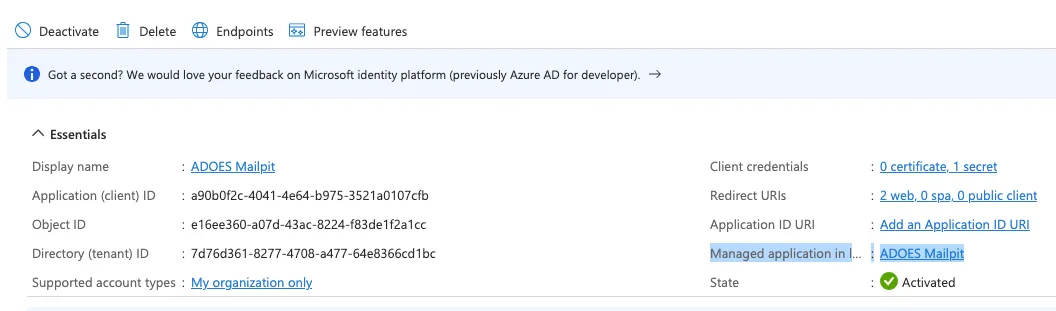
There are two distinct settings panels for an Entra ID app:
- The App Registration
- The Managed Application in Local Directory
The Managed Application settings are where SAML settings live. For OIDC apps, that screen offers a few functional features that may be of interest: application assignment & which groups/users are authorized to log in. It can be accessed from the application registration:
Group Claims
Section titled “Group Claims”Entra ID cannot include more than 50 groups in the claim.
It is recommended that you specify which group(s) are relevant, so Entra ID can return only that list. Otherwise, the list may be truncated at random and not include important group information that the application needs.
There is also a way to create “permissions” in the app registration and map them to group memberships, but we have not explored this functionality.
Libraries
Section titled “Libraries”Shibboleth
Section titled “Shibboleth”Shibboleth is a SAML service provider.
It is commonly used for setting up SSO with external applications that are part of the InCommon federation.
This makes it easy for anyone at another institution to log in. For research-focused apps where cross-institution collaboration is common, Shibboleth may be a better choice than Entra ID.
This method MAY be used if there is a business, regulatory, or technical requirement to use it. Otherwise, it is discouraged in favour of Entra ID.
Agentless SSO
Section titled “Agentless SSO”Agentless SSO works by looking up a user’s nusso cookie via the Agentless WebSSO API to determine if they have a valid login session.
This method MAY be used if another option is not feasible. The widely-shared nature of the session cookie gives this option worse security characteristics than Entra ID, so it is discouraged.
Access to the API is available from the public internet. Access must be granted by the Identity & Access Management team via the API Service Registry.
sequenceDiagram
    actor User as User (Browser)
    participant App as App Server
    participant SSO as SSO / Agentless WebSSO API

    User->>App: Request page (no `nusso` cookie)
    App->>SSO: Validate `nusso` (none present)
    SSO-->>App: Invalid / no session
    App-->>User: Redirect to SSO login
    User->>SSO: Follow redirect, authenticate (netID + Duo MFA)
    SSO-->>User: Set `nusso` cookie, redirect back to app
    User->>App: Request page (with `nusso` cookie)
    App->>SSO: Validate `nusso`
    SSO-->>App: Valid session — returns netID and MFA status
    App-->>User: Serve authenticated response
Implementation Notes
Section titled “Implementation Notes”The nusso cookie is configured to be available for all subdomains on .northwestern.edu. It is httpOnly, which means single-page apps (SPAs) or other client-side JavaScript will not be able to read the value. It is secure and only sent over https.
Client-side code making API calls should consider when XMLHttpRequest and fetch will include the nusso cookie:
fetchwill use the origin policies to determine if the cookie should be included automaticallyXMLHttpRequestneeds thewithCredentialsoption to include the cookie
Libraries
Section titled “Libraries”PingAM Agent
Section titled “PingAM Agent”The PingAM agent is a webserver plugin that handles OIDC for your application, instead of being something integrated into your codebase. It does SSO, and only allows a request to proceed to the backend application when a valid session exists. It will include the netID of the user in a header.
This method SHOULD NOT be used.
The agent works best on IIS & Apache. It may not be available for your webserver.
The webserver plugin intercepts requests and prevents them from being sent to the backend application unless the user is authenticated. This may be a useful security characteristic: attackers need a valid netID session to probe your application. This protection may be weakened by configuring exemption from the agent’s coverage for specific URLs, like APIs.
LDAP Bind
Section titled “LDAP Bind”To authenticate a user using an LDAP bind, an application collects their netID and password, then attempts to connect to LDAP as that user. If it succeeds, the credentials are correct and the application may allow their login to proceed.
Basic directory information about the user, like their name and email, is available from LDAP as a result of the bind and can be used by the application.
This method MUST NOT be used. It requires processing a user’s netID password in-app, which creates additional risk over all the other available SSO options.
Duo MFA is not inherently part of the login flow with this method. If it is used, applications MUST implement their own Duo integration to ensure MFA is required.
Applications using this method must be able to access ldap://registry.northwestern.edu:636, which requires firewall rules and an access grant by Identity & Access Management.
Footnotes
Section titled “Footnotes”-
Entra ID was formerly known as Azure Active Directory (AAD). ↩
-
Shibboleth may occasionally be referred to as Fed in older documents. ↩
-
PingAM was formerly known as ForgeRock AM and OpenAM. ↩
-
Hybrid (on-prem & cloud) Shibboleth hosting is being discussed. If the timeline/availability of hybrid hosting is important to your app for business continuity reasons, talk to the Identity & Access Management team. ↩
-
LDAP remains a supported mechanism for looking up data about a netID via a service account. ↩