General Coding Standards
These standards apply to all code, regardless of tech stack or language. More specific guidance on applying them may be provided in a tech stack’s coding standard documentation.
Code Management
Section titled “Code Management”Application code MUST be stored in a version control system. Teams SHOULD use the Northwestern GitHub enterprise instance for this purpose.
The version control workflow for moving from feature/bug development to a stable branch/tag MUST be documented for each repository.
Repositories SHOULD have a README.md file at the project root containing essential information:
- A high-level description of the application and its purpose.
- Instructions for setting up a local development environment, including any necessary dependencies and configuration steps.
- The development workflow.
Code Style
Section titled “Code Style”Each repository MUST have a selected coding style guide. This MUST be documented, and SHOULD be enforced by automated tools. Teams MAY have different code style guides for the same tech stack in different repositories.
Consistent code style aids in reviewing code by reducing stylistic “noise” in diffs, like spacing changes, shifting code between lines, and moving curly braces around. Constant stylistic changes in diffs reduces their focus on impactful code changes. Eliminating these by consistently & automatically enforcing one style guide aids in code review.
Code Review
Section titled “Code Review”Developers SHOULD have at least one peer review code changes before they are deployed. Changes SHOULD have a suite of automated checks run against them to detect problems.
The code review process should begin with automated tools applying coding style fixes. Automatic enforcement of coding style will keep the diffs to a minimum.
These things will commonly be in the form of GitHub pull requests, where peers can be tagged in for feedback, and automated tools can run to alert developers about potential issues.
Local Development
Section titled “Local Development”It SHOULD be possible to run a repository entirely locally on one developer’s laptop, without the use of external resources such as AWS S3 buckets or a shared database.
Local environment isolation is necessary for switching between feature branches and the ability to run tests in CI/CD. This can usually be accomplished with a combination of framework drivers, stand-in services, service mocks.
Repositories SHOULD contain crafted sample data for testing and developing the application. This is necessary for developing stable end-to-end tests and running them in CI/CD.
Automated Tests
Section titled “Automated Tests”Repositories SHOULD have automated tests for the application.
Automated testing and quality tools are critical to enabling agile software development. The goal is to deploy product changes frequently, and these tools create a safety net for developers.
Repositories should have a thorough suite of tests that developers can run while they work, are run automatically during code review, and are run again before deployment to catch any issues potentially introduced from merges.
Beyond being a guard-rail that stops broken code from making it into production, the tests give us several other benefits:
- When upgrading language runtimes/libraries/frameworks, tests will reveal breaking changes.
- When reviewing code, if a reviewer sees a thorough test was added for the feature (or an existing test covers a fix), they have an easy way to verify things are working (or the CI process has already run it and reflects it is working).
There are several types of testing that exercise different aspects of a repository, and require different levels of effort to create & maintain. The specific tools will vary between tech stacks. Some of these may not be applicable to all types of applications.
| Type | Purpose | Effort | Example Tools |
|---|---|---|---|
| End-to-End | Use the product like an end-user. Difficult to write, slow to run, but they give you the best feedback. | High | Playwright |
| Integration | Runs multiple units together to make sure they’re delivering the expected business outcome. Fine-grained & easy to check edge cases. | Medium | PHPUnit |
| Unit | Run a single unit (usually a class) in isolation. Best way to test complex business logic. | Medium | PHPUnit |
| Static Analysis | Flags incorrect type usage in weakly-typed languages (PHP, JS) that can cause unexpected errors | Very Low | PHPStan |
In general, the automated testing strategy should be to create end-to-end tests that covers the product’s happy path(s). Any domain should have integration/unit tests which thoroughly tests the business logic.
Access control logic SHOULD have tests to thoroughly validate it, including validation that access is correctly being denied. This logic SHOULD be checked in multiple layers of tests:
- Validating a webpage’s correct usage of access control code in an end-to-end test assures that the access control logic has been included; and
- Checking the implementation thoroughly in a unit or integration test, including edge cases, gives confidence that the logic is correct.
Static analysis tools SHOULD always be used for dynamically- or weakly-typed languages. They MAY be used with statically-typed languages, but the compiler is usually providing this functionality.
Over the repository’s lifetime, most of the test development effort1 should be spent on integration/unit tests. It’s very easy to set up specific situations & feed in input data that checks the happy path for our business logic, as well as all the edge cases and inputs that should cause errors. These tests can generally manipulate the database directly, fake/stub other parts of the application, and can be individually run for immediate feedback on code changes.
When creating a brand-new product from scratch, the team should carefully consider when to create end-to-end tests. These depend on the website’s design and the “happy path” — both of which may change rapidly during the early iterations. As a general yardstick: a couple tests early on are helpful, but when the business partner is happy enough with something for it to go live is when the team should ensure thorough end-to-end coverage.
Web Applications
Section titled “Web Applications”Authentication
Section titled “Authentication”Applications for Northwestern students, faculty, and staff MUST use some form of SSO. The SSO logins MUST use Duo MFA for all users2.
| SSO Method | Use Cases |
|---|---|
| PingAM Agent | Installable web server plugin that protects the application with SSO. |
| PingAM Agentless | APIs that developers can implement in their application to use the nusso cookie for SSO with the PingAM backend. |
| Fed/Shibboleth SAML | On-prem SAML provider that plays nicely with other InCommon institutions. |
| Azure Entra ID OpenID Connect | Self-service SSO using the widely-supported OpenID Connect standard. Developers, sysadmins, or vendor SaaS products can use implement SSO with this. |
| Azure Entra ID SAML | Self-service SSO using SAML, which is often needed for vendor SaaS applications. |
For custom web applications, Azure Entra ID OpenID Connect SHOULD be used. This will have the best out-of-the-box support from frameworks, libraries, or even infrastructure.
There are circumstances where the other methods may be appropriate; the rationale for a different choice SHOULD be included in the technical documentation.
Non-Northwestern Users
Section titled “Non-Northwestern Users”Some applications may require participation by community members without netIDs. Parents, alumni, and collaborators from other institutions frequently may be needed.
Access by non-SSO users SHOULD be limited to the specific information they need.
Accessibility
Section titled “Accessibility”All web applications MUST be compliant with the Web Content Accessibility Guidelines 2.1 standard’s AA-level requirements3.
Teams SHOULD implement automated tools to check their application for compliance. These tools are not able to fully ensure compliance or detect all problems, but they ensure a good baseline and draw attention to obvious issues.
Cookies
Section titled “Cookies”Applications SHOULD only set necessary & functional cookies, as defined by the California Privacy Rights Act (CPRA). This is similar to the GDPR. Avoiding setting unnecessary cookies will prevent an application from needing a cookie consent banner/widget.
Applications SHOULD set their cookies on their own subdomain instead of the shared .northwestern.edu domain. When there is a need to share data cross-origin using cookies, applications SHOULD seek to set minimize the size of these cookies. The value will be sent with every request to all Northwestern sites and CDNs, which can add up over time.
Essential cookies SHOULD be set with the secure flag to prevent transmitting them over unencrypted HTTP connections. Cookies SHOULD use the httpOnly flag, unless there is a need to read the values from JavaScript.
Cookies SHOULD have a reasonable expiration time based on their purpose.
Applications MUST consider cookies to be insecure user input and treat them similar to other user inputs. Applications SHOULD consider signing sensitive cookies to prevent users from tampering with the value.
Logging
Section titled “Logging”Applications SHOULD implement audit logs that track write operations and attribute them to a specific user and retain this data for at least 90 days. Applications SHOULD implement login tracking for users, recording when a login occurred, and retain this data for at least 90 days.
These logs may be useful if questions arise about why something was edited or during an incident response.
Suspicious Activity
Section titled “Suspicious Activity”Applications SHOULD log a message when a user performs a suspicious operation that may indicate they are trying to bypass security mechanisms. When logs are aggregated, suspicious activity logs can be used when investigating an incident. Several suspicious activity logs for one netID across several applications can be used to trigger alerts for follow-up.
“Suspicious activity” is a nebulous term and developers will need to use their judgement to determine what that means for an application. Some examples:
- User is denied access to POST updates to a record they do not have access to (CAPEC-21)
- This could indicate somebody is manipulating the URL when saving a form.
- An IP address becoming rate-limited by too many failed login attempts (CAPEC-112)
- These logs could contribute to university-wide fail2ban-style response
- CSRF token validation failures (CAPEC-62)
- This could indicate somebody is attacking one of our users.
It SHOULD be prefixed with suspicious activity, and contain the below keys in a Splunk key-value format4.
type: code describing the type of activity using a CAPEC identifieruserID: user’s netID or unique identifier, when there is a valid user session- If netID is not available, another identifier that makes sense like email (or for applications that allow non-Northwestern users, a username) can be used.
- Avoid using an app’s internal user ID number, since this is not meaningful beyond one application.
userIPAddr: the IP address of the user or requester, when available.userAgent: for web applications, the requester’sUser-Agentrequest header, if it is available.
For example:
suspicious activity type=CAPEC-21, userID=jsmith, userIPAddr="67.67.67.67", userAgent="Mozilla/5.0 (Linux; Android 10; K) AppleWebKit/537.36 (KHTML, like Gecko) Chrome/143.0.0.0 Mobile Safari/537.36"When using a Web Application Firewall (WAF), it will block suspicious activity before it reaches the application. These event logs can be aggregated directly from the WAF logs instead of relying on the application logs.
Error Monitoring
Section titled “Error Monitoring”Applications SHOULD have error monitoring in place. This can be integrated into the application’s exception handler, or it can be done through log monitoring and alerting.
Developers SHOULD monitor trends and sudden upticks in errors so they can proactively fix them. Not every unhandled error requires intervention, but awareness will help developers identify and fix major problems promptly.
Web applications SHOULD have error monitoring for both the backend and frontend.
Sentry
Section titled “Sentry”Applications MAY use Sentry for error monitoring. Northwestern has an enterprise license, which can be shared across the university at no cost to development teams.
Sentry offers features beyond error monitoring: performance monitoring, cron monitoring, and more. These features MAY be used, but they are not considered in this section.
When using Sentry, the coding standard in this section SHOULD be followed.
All applications SHOULD include an appropriate backend SDK error tracking.
Web applications SHOULD include an appropriate front-end SDK to monitor for client-side JS errors. The specific SDK used depends on the frontend tech stack. Regular JavaScript would use the Browser Javascript SDK, but more specific SDKs for React/Vue/etc should be used when applicable.
By default, Sentry frontend SDKs will report data directly to the sentry.io ingest URL. This URL is typically blocked by ad-blockers, which disrupts error reporting. To mitigate this, frontend SDKs SHOULD be configured to use the tunnel option, and applications SHOULD implement a proxy endpoint to accept data from the frontend SDK and pass it to Sentry. This configuration avoids ad-blockers eating client-side error reports.
Other Tools
Section titled “Other Tools”Applications MAY use other tools for error monitoring.
New Relic is another solution that typically works by instrumenting the language runtime, as opposed to Sentry’s approach of instrumenting the application code.
Beyond the basic error tracking functionality, New Relic offers other features that Sentry does not. There is no Northwestern enterprise license for New Relic.
Dependency Management
Section titled “Dependency Management”Applications SHOULD use a dependency management tool with both a package manifest and lockfile to include 3rd party libraries. The lockfile SHOULD be committed to the repository. The lockfile SHOULD be monitored for security updates to dependencies, and these updates SHOULD be applied in a timely manner.
This will ensure developers & the deployed environments are all running on the same versions of their dependencies.
These files enable the use of services such as Dependabot, which can proactively monitor for outdated packages and alert developers about security updates.
At an enterprise level, the information security team can use the lockfiles for reporting on potentially-vulnerable applications during an incident response for a new vulnerability.
Package Selection
Section titled “Package Selection”When deciding to add a dependency on a 3rd party package, developers SHOULD consider if the dependency is necessary.
For small pieces of functionality, it may be easier to implement it instead of managing a 3rd party dependency. The left-pad incident illustrates the trade-off: developers wanted to avoid reimplementing a small function, and the result was a global outage when the left-pad package became unavailable.
Developers SHOULD strongly prefer dependencies that are actively maintained. When there are unaddressed security vulnerabilities or compatibility problems, this indicates that the dependency is likely to cause more problems than it solves. Dependencies developed and maintained by major ecosystem players (e.g. Symfony in the PHP ecosystem) should be preferred. Established authors & community projects with funding sources will typically be more reliable in preventing and responding to security issues.
Configuration Management
Section titled “Configuration Management”Configuration SHOULD NOT be hard-coded into an application. Environment-specific configuration files MAY be included in a repository, since they will benefit from version control. They MAY be in a separate repository from the application code in cases where different groups are managing them.
Plaintext secrets such as password, API keys, private keys, and session tokens MUST NOT be included in version control. A copy of the application code from source control MUST NOT inherently grant a developer access to other resources, such as a database with level one data.
This does not prohibit the inclusion of encrypted configuration files that contain secrets. The decryption keys for an encrypted file MUST NOT be stored in version control.
Releases
Section titled “Releases”Libraries MUST follow the Semantic Versioning standard, since package management usually depends on this.
For consistency, releases of applications and data integrations follow the Semantic Versioning standard to the best of their ability. This standard is written with libraries in mind, so it is not always clear what a breaking change requiring a major version bump would be in the context of a web application. This will be situation-dependent and is left up to the judgement of the team doing the release.
Application & Integration Change Logs
Section titled “Application & Integration Change Logs”Release notes SHOULD be created for each release of an application. These SHOULD be available to high-level users of an application, and MAY be available to all users. The release notes SHOULD be written with application users in mind and SHOULD NOT be overly technical.
The release notes should generally contain a summary of all user-impacting changes: both bug fixes, new features, and removed functionality. If applicable, each line can tie back to a ticket with the request, issue, or requirement history and context.
The format of the release notes is up to the application. There SHOULD be a documented template for a new version in the repository.
A note about a new feature MAY provide an explanation of what it is, who it is meant for, and how to access it. A note for a bugfix MAY include the circumstances under which the bug could occur. Here is a high-level example format in Markdown, where each change links back to a JIRA ticket in the PROJ project:
# v1.2.3
This release focuses on adding tools for teaching assistant's to collaborate with students better.
## Enhancements
- Wildcard photos are now included in the student profile. ([PROJ-6767](https://jira.example.com/browse/PROJ-6767))
### Teaching Assistants
- Added a new dashboard with student assignments. This is available to users with the Teaching Assistant role from the main menu. ([PROJ-1234](https://jira.example.com/browse/PROJ-1234))- Professors can add Teaching Assistant users from their class page. ([PROJ-6767](https://jira.example.com/browse/PROJ-6767))
## Fixes
- When a student enabled dark mode and the class profile was configured with a custom header image, in some cases the class name would not be visible. This has been fixed. ([PROJ-421](https://jira.example.com/browse/PROJ-421))
Release notes MAY be accessible in a machine-readable format, such as RSS/Atom, JSON Feed, or similar. This enables users and support staff to monitor & get notifications about release via something like Microsoft Teams.
Library Change Logs
Section titled “Library Change Logs”Release notes MUST be created for each release of a library. These MUST be available with the source code.
The Keep a Changelog SHOULD be used, with the release aligned to the semantic version. If the language’s package ecosystem has chosen another format, that SHOULD be used in place of the Keep a Changelog standard.
The Keep a Changelog information can be consumed by tools like GitHub’s Dependabot, enabling it to include a list of changes with its update pull requests.
Documentation
Section titled “Documentation”There SHOULD be a documented location for functional documentation, requirements, project artifacts, and operational procedures linked in a repository’s README.md. These MAY be stored in different locations.
Requirement Documentation
Section titled “Requirement Documentation”Documentation of requirements from users, regardless of their form, SHOULD be captured somewhere. This can be an issue tracker, functional specification documents, or similar.
There SHOULD be a way to reference specific requirements using a unique identifier. For example, JIRA tickets have issue numbers like FOO-123, or a functional specification has a section numbering scheme.
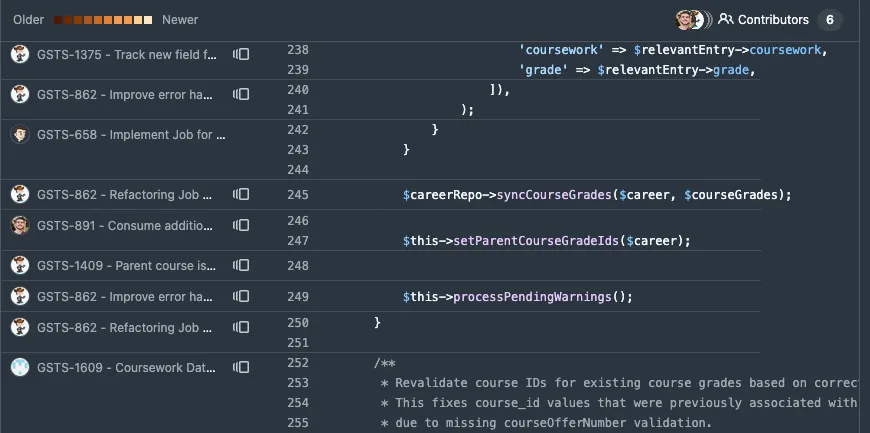
Commits to version control SHOULD reference the requirement(s) they are addressing. This often takes the form of including the JIRA ticket number in the commit summary: FOO-123: Add grade report permission.
This practice enables a future developer to trace changes to individual lines of code back to their requirements by way of the ticket/requirement reference:
Technical Documentation
Section titled “Technical Documentation”Internal technical documentation about an application SHOULD be maintained. This documentation should include repository-specific guides, notes, and reference for UI widgets/patterns, important internal APIs, and other information that would be helpful for developers working on the app.
This documentation MAY be stored in the repository alongside the code. The proximity of documentation to the code will encourage developers to maintain them — it’s harder to forget if there is a docs/ folder next to src/ in the IDE.
The documentation SHOULD be written in a plain text format like Markdown. If the documentation is being converted into other formats for publishing, or a tool like MediaWiki is being used, the appropriate format (e.g. WikiText, LaTeX) SHOULD be used instead of Markdown.
Including this documentation with the repository in a plain-text format will make it available to tools in the IDE and other developers who are onboarding to the project.
To provide a concrete example, below are the topics covered by the Graduate Student Progress internal developer documentation. Each application has its own needs; this is meant to illustrate the types of information covered by internal developer documentation.
- Introduction to App, explaining the purpose, goals, and primary users of the application, plus its tech stack and basic architecture.
- Developer Onboarding, including detailed notes on setting up local development environments for different purposes, and troubleshooting steps.
- Development Workflow, documenting how requests translate into JIRA tickets for work, the Git workflow to use, and the definition of done for a ticket.
- Coding Standards, containing the coding style guidelines and recommended file structure.
- Database Standards, explaining the Eloquent ORM config & configuration data loading scheme.
- User Interface, documenting the UI widgets used in the project.
- Audit Logging, covering when to disable automatic audit logging & how to handle it during bulk operations where it could cause performance issues.
- Event Messaging, which covers the internal API and custom PHP attributes to annotate an object to send it out through EventHub.
- Testing, mostly covering the Cypress end-to-end testing integration into the application and how developers set up specific data when writing tests.
- Data Integration, a detailed explanation of how the application loads data from CAESAR & MyHR.
- Plan of Study Data Flow, which explains a complicated data flow in the application, so developers will understand how it is meant to work before working on the Plan of Study subsystem.
- Auth Overview, covering how non-Northwestern users authenticate and what limits must be placed on them when adding new functionality they need to access.
- Working with Authorization, detailing the tree of roles and how schools have oversight of academic programs, adding new permissions, and how roles/permissions interact with data access policies.
Operational Documentation
Section titled “Operational Documentation”Operational documentation typically covers manual processes run in the production environment for periodic tasks, break-fix scenarios for data, or other administrative tasks that are not provided in an application and must be completed by an administrator in the backend.
As much as possible, this type of work SHOULD be minimized by adding the functionality (or fixing a bug) to the application. Manual backend intervention in a production environment creates risks for auditability, security, and — if somebody makes a bad-enough typo — stability.
Documentation in the repository SHOULD follow typical code review processes. When relevant changes are made to the code, the documentation MAY be updated at the same time, allowing pull request reviewers to check it in the context of the code changes.
Operational procedures SHOULD go through code review. These are often similar in scope and impact to application code. Somebody modifying a sequence of SQL statements to correct data in production can introduce bugs or other issues; the team should review proposed changes to identify potential pitfalls.
Secure Coding
Section titled “Secure Coding”Application code MUST treat user input as potentially-malicious and validate it before processing and re-displaying it. Application code MUST be paranoid and validate all inputs and conditions.
Developers SHOULD complete the Developing Secure Software (LFD121) course offered by the Linux Foundation at least once.
Developers SHOULD be aware of the OWASP Top 10 list of common web application vulnerabilities. OWASP provides detailed information about trends in web application security vulnerabilities.
Frontend Assets
Section titled “Frontend Assets”Web applications commonly include CSS, JavaScript, fonts, and images for their frontends. Applications SHOULD serve these assets from a server or CDN that Northwestern controls.
Third Party CDNs
Section titled “Third Party CDNs”Third-party content delivery networks (CDNs) for frontend asset distribution like jsDelivr, cdnjs, code.jquery.com, and fonts.googleapis.com are convenient. Some types of assets include code (JavaScript, SVGs), which turns them into an attack vector when the CDN has a security incident.
If assets are included from a third-party CDN, applications SHOULD take advantage of security features to mitigate attacks.
Javascript libraries and CSS stylesheets from a third-party CDN MUST load a specific version of a package and use subresource integrity to ensure the JavaScript has not been tampered with.
The integrity hash is specified. If an attacker changes the React v19.1.1 files on the CDN, the browser will refuse to execute the compromised version.
The crossorigin and referrerpolicy attributes are also included here.
<script src="https://cdnjs.cloudflare.com/ajax/libs/react/19.1.1/cjs/react.production.min.js" integrity="sha512-Fpy3gN6679IxNCKdpQGYyYF/QoXTWctUB5jtb+DipQXBLFzkzCrTbNlZPT3rcuc7ARVPLAQtmFyNOx0h5/7MVA=="></script>This example does not include an integrity property.
If the CDN is compromised and React v1.19.1 is replaced with a malicious version, it could HTTP POST user data to an attacker’s server.
<script src="https://cdnjs.cloudflare.com/ajax/libs/react/19.1.1/cjs/react.production.min.js"></script>Footnotes
Section titled “Footnotes”-
The strategy on where to spend time developing tests is based on Kent C. Dodds’ testing trophy, which is a riff on Martin Fowler’s testing pyramid. ↩
-
Historically, some applications have not used MFA to avoid needing to enroll a newly-matriculated student in Duo before they can complete a required admissions-related task. As of summer 2025, all students must set up MFA during netID activation. CAESAR, myHR, and NUFinance all require MFA. TeamDynamic ticket # 545820 contains attestations from ES Student, Identity, and Collab Services about MFA during netID activation. ↩
-
The Office of Civil Rights and Title IX Compliance sets our Digital Accessibility Policy, which established this as a “MUST” requirement. ↩
-
This format is also known as
logfmt. Check your logging library for built-in support. ↩